The best AI image prompts are not the longest prompts. They are the prompts that keep the job clear after you change the product, person, channel, reference image, or model. Use this guide as a practical prompt bank for Vogue AI: copy the structure, replace the variables, then revise the first result by the failure you can actually see.
TL;DR: the reusable prompt bank
- Pick the visual job first: product, professional photo, social post, brand board, or UI mockup.
- Keep the prompt skeleton stable for the first run, then change one control at a time.
- Use a reference image when shape, face, packaging, palette, or interface hierarchy must survive.
- Keep final text, logo cleanup, prices, and legal claims out of the generated image.
- Save the prompt version that fixed the job and reuse that version inside Vogue AI.
How to choose the best prompt for the job
| Search need | Best starting prompt | Model fit | Reference rule |
|---|---|---|---|
| Realistic product photo | Subject plus material, light, crop, and background. | GPT Image 2 for controlled edits. | Use reference for silhouette, packaging, or color. |
| Professional photo | Portrait brief with expression, wardrobe, lens, and skin texture. | Nano Banana for quick variations; GPT Image 2 for stricter identity control. | Use reference for face identity and hair shape. |
| Aesthetic social image | Subject, mood, palette, channel ratio, and text-safe negative space. | Nano Banana for rapid social exploration. | Reference is optional unless brand palette must match. |
| Brand visual system | Board layout with product detail, swatches, materials, and art direction. | GPT Image 2 for structure; Midjourney for mood exploration. | Reference protects product and brand cues. |
| Stylized concept art | Scene, composition, style reference, mood, and output ratio. | Midjourney for expressive style exploration. | Use reference only when continuity matters. |
Copy and paste prompt examples
Copy one block exactly for the first pass. Replace only the bracketed variables before you judge the result.
- Product detail prompt: Ultra-realistic product photograph of [product], exact material [material], clean [background] setting, soft studio key light, crisp edge separation, subtle shadow, ecommerce-ready 4:5 crop, no text, no watermark.
- Professional photo prompt: Editorial portrait of [person], natural skin texture, confident relaxed expression, wardrobe in [palette], daylight studio lighting, shallow background separation, sharp eyes, 3:4 crop, no extra hands, no text.
- Aesthetic social prompt: Lifestyle image for [topic], main subject [subject], cohesive color palette [palette], natural props, clear negative space, premium social campaign composition, 9:16 ratio, keep all text areas empty.
- Brand board prompt: Visual style guide board for [brand], product close-up, color swatches, material samples, packaging detail, clean grid layout, premium art-direction mood, 16:9 ratio, no generated words.
- UI showcase prompt: High-resolution marketing mockup for [app], realistic device frame, readable interface hierarchy without fake copy, soft reflections, clean workspace, 16:9 crop, no floating decorative clutter.
Example 1: brand board prompt
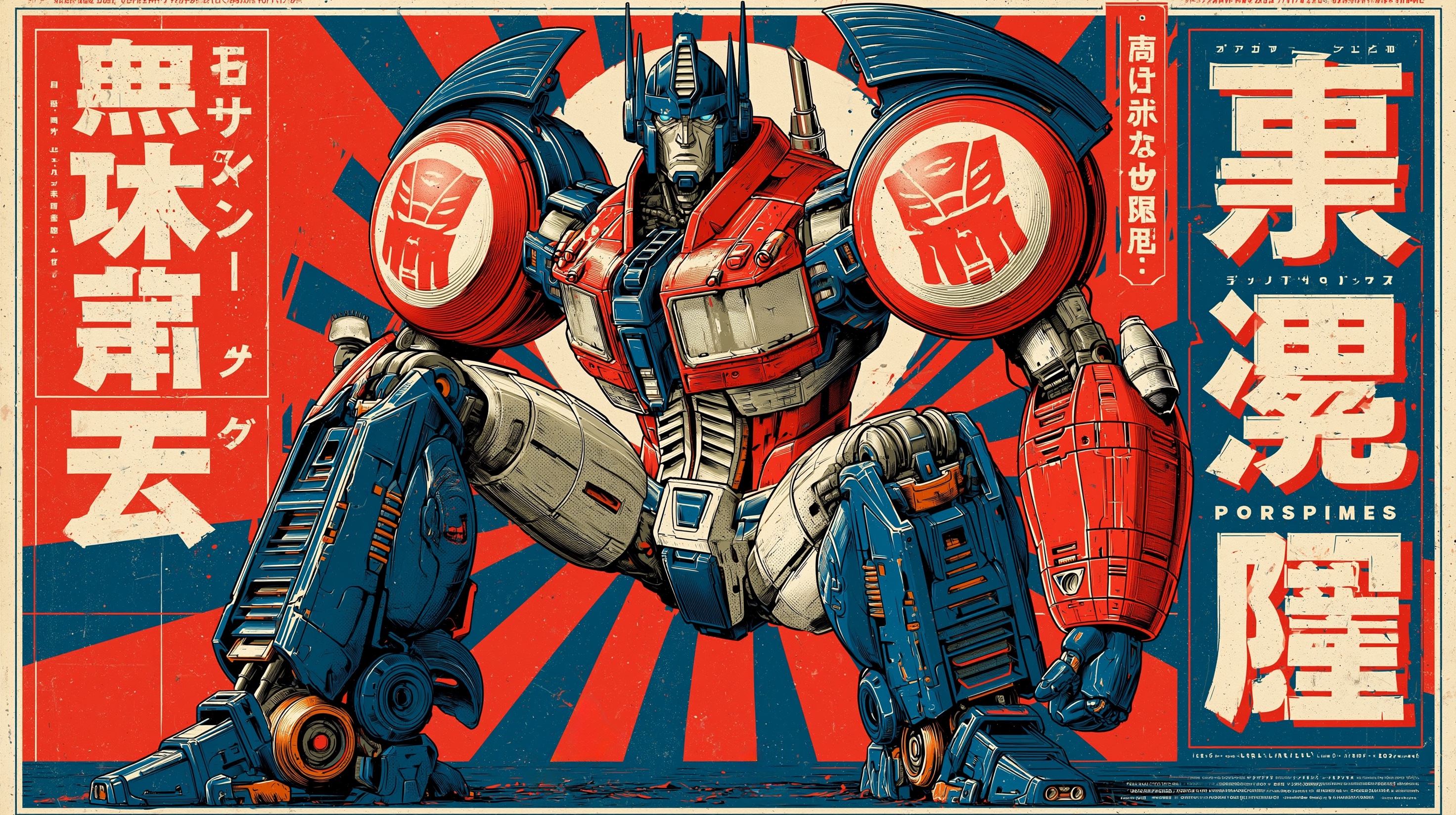
For brand boards, the prompt has to control layout as much as style. Ask for product close-ups, swatches, material samples, and packaging details in a clean board instead of asking for one attractive image.
Example 2: professional photo prompt
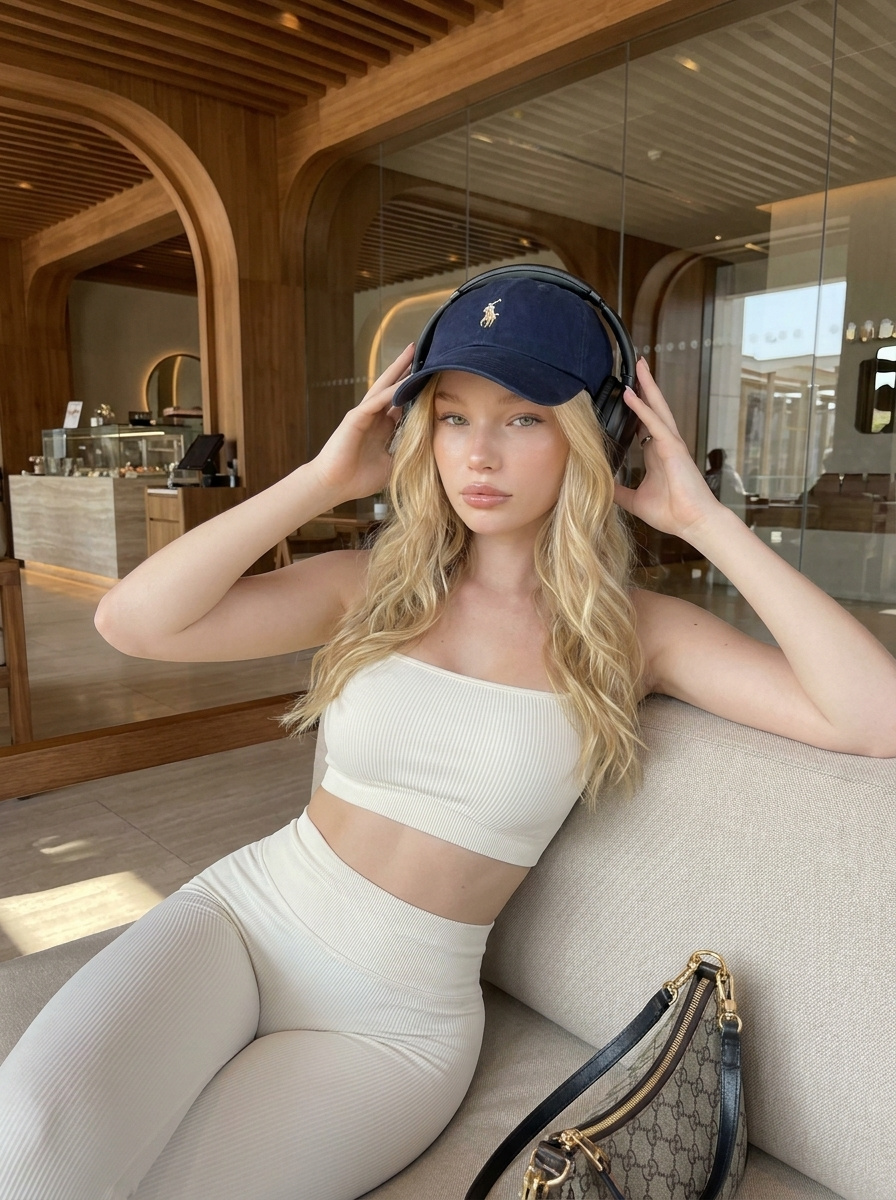
When the person needs to remain recognizable, the reference handoff matters more than extra adjectives. Say what the uploaded image controls and what the model may reinterpret.
Prompt formula that keeps results controlled
| Prompt part | What to write | What it prevents |
|---|---|---|
| Subject | The exact product, person, object, screen, or scene. | The model choosing a prettier but wrong subject. |
| Composition | Crop, angle, distance, negative space, and frame purpose. | Messy layouts and unusable thumbnails. |
| Style | Material, color palette, realism level, mood, and brand tone. | Generic output with no production direction. |
| Reference handoff | What the uploaded image must preserve. | Identity drift across product, face, logo, or UI. |
| Output rules | Aspect ratio, no text, no watermark, transparent background, or safe area. | Assets that look good but cannot be used. |
Reddit-style prompt advice that is actually useful
Community prompt threads often ask for secret wording. The useful pattern is more practical: share the visual goal, the image that inspired it, the prompt skeleton, and the first failure. That gives you something repeatable instead of a one-off magic sentence.
- Ask for a prompt pattern, not only a finished prompt.
- Attach the image or style family you want to match when continuity matters.
- Name the first failure you need fixed: crop, identity, background, hands, text, or product shape.
- Avoid unsupported claims such as perfect logos or guaranteed readable text.
Free workflow inside Vogue AI
A free prompt bank is useful only when it tells you what to change. In Vogue AI, start from a prompt-library example, choose a model, paste the prompt, add a reference image when needed, and save the version that solved the job.
- Use GPT Image 2 when instruction following and reference control matter.
- Use Nano Banana when you want quick social, portrait, or variation tests.
- Use Midjourney when the job is mood, editorial styling, or concept exploration.
- Keep the same prompt skeleton when comparing models.
First-result checklist
- Subject: is the product, person, UI, or object still correct?
- Composition: does the crop match the channel?
- Background: does it support the subject instead of competing?
- Text: is generated text avoided or safely left blank?
- Reuse: can this prompt version become the next template?
FAQ
What are the best AI image prompts for beginners?
Start with product, portrait, social, brand board, and UI prompt structures. They cover most practical image jobs and are easy to adapt.
Can I use these AI image prompts for friends?
Yes, but use consent and avoid identity-sensitive edits without permission. For portraits, use a reference image only when the person agrees.
What prompt works for realistic photos?
Use a concrete subject, camera distance, natural texture, lighting, crop, and a no-text rule. Add a reference image when identity matters.
Are aesthetic prompts different from professional prompts?
Aesthetic prompts can prioritize mood and palette. Professional prompts need stricter subject, composition, and output rules.
Should prompts include final social media text?
Usually no. Reserve clean negative space and add final typography in a design tool.
How do I make a prompt reusable?
Mark the variables, keep the controls that worked, and save the prompt after the first successful correction.